Hosting Requirements & Guidelines
The current deployment (see Deployment Guide) runs on free-tier Vercel and Render. This page specifies what a more resilient deployment looks like — either fully on-premise or on cloud infrastructure — once the platform outgrows free-tier hosting, and once the TechGroups domain goes live alongside the main application.
Reference architecture
Both the main application domain and the TechGroups domain resolve through one DNS zone, then pass through the same edge path before reaching a shared backend cluster and data tier.
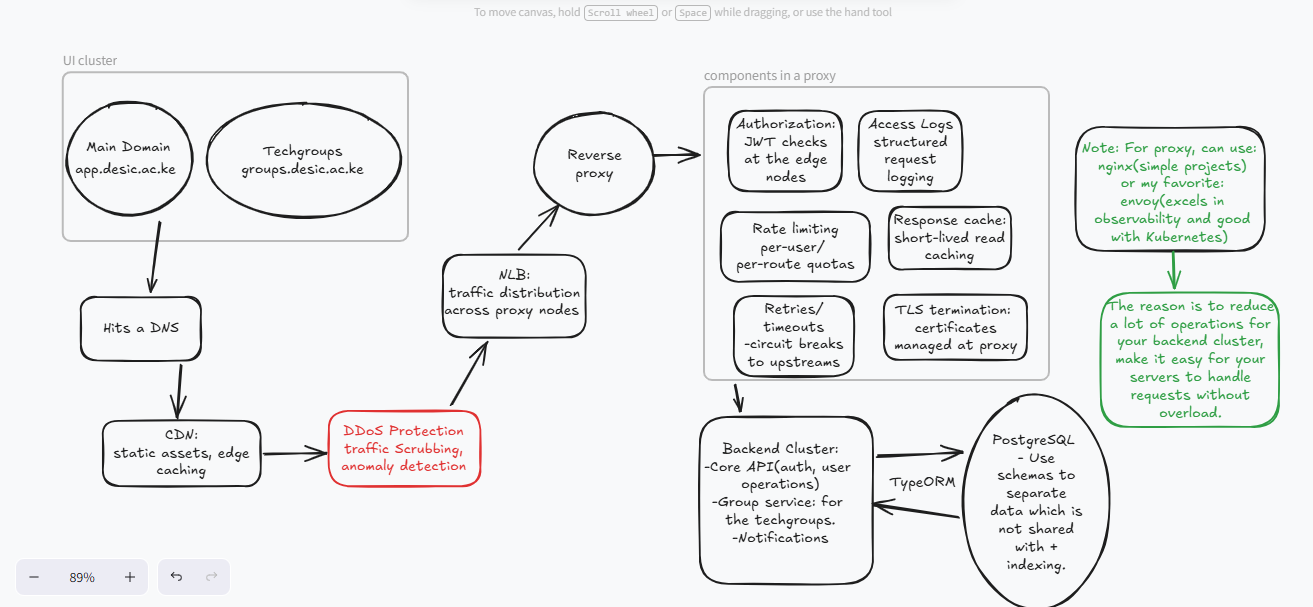
The path, top to bottom:
- DNS — a single zone resolving both the main domain and the TechGroups domain.
- CDN — serves static assets and caches cacheable responses at the edge, closest to the user.
- DDoS protection — scrubs volumetric and protocol-level attacks before traffic reaches anything stateful.
- Network load balancer (NLB) — distributes connections at layer 4 across a pool of reverse proxy nodes.
- Reverse proxy (Envoy) — the policy layer: authorization, access logging, rate limiting, response caching, retries/circuit breaking, and TLS termination all live here, in front of application code.
- Backend cluster — the Core API, Groups Service, and Notifications service described in System Architecture.
- Data tier — a shared PostgreSQL primary/replica pair, per the data model.
Edge security
DDoS protection and Envoy-level authorization mean unauthenticated or abusive traffic is rejected before it ever reaches application code.
One edge, two domains
The main app and TechGroups share the same CDN, DDoS, load balancing, and proxy layer — only the backend routing differs.
Stateless backend
Because sessions live in JWTs, any backend node behind the load balancer can serve any request, which is what makes horizontal scaling possible.
Shared data tier
One PostgreSQL cluster serves both domains, keeping mentor, project, and membership data consistent across the main app and TechGroups.
On-premise hosting
Hardware guidelines
| Component | Minimum | Recommended |
|---|---|---|
| Reverse proxy nodes | 2 vCPU / 4 GB RAM each, 2 nodes | 4 vCPU / 8 GB RAM each, 3 nodes |
| Backend application nodes | 2 vCPU / 4 GB RAM each, 2 nodes | 4 vCPU / 8 GB RAM each, 3+ nodes |
| PostgreSQL primary | 4 vCPU / 8 GB RAM, SSD storage | 8 vCPU / 16 GB RAM, NVMe storage, RAID 10 |
| PostgreSQL replica | Match primary | Match primary, separate physical host |
| Load balancer appliance | 2 vCPU / 4 GB RAM | Dedicated hardware LB or HA pair |
Network and facility requirements
- A dedicated VLAN separating the reverse proxy tier, backend tier, and database tier, with firewall rules restricting east-west traffic to only the paths shown in the diagram above.
- Redundant internet uplinks if the institution intends to guarantee the 99.5% uptime target from Non-Functional Requirements without depending on a single ISP.
- An uninterruptible power supply and, ideally, generator failover for the database tier at minimum.
- TLS certificates issued and renewed centrally at the reverse proxy layer, not per backend node.
Operational requirements
- A named owner for patching the operating system and PostgreSQL on a regular schedule — this responsibility is easy to lose track of once the original two-person team hands the system off (see Challenges & Lessons).
- Centralized log shipping from Envoy's access logs and backend application logs to one place, so an incident doesn't require SSHing into multiple hosts to reconstruct what happened.
- A tested backup and restore procedure for PostgreSQL, run on a schedule, not only after an incident.
- A basic runbook for failover: what to do when the primary database node becomes unreachable, and who is authorized to promote the replica.
When on-premise makes sense
On-premise hosting is worth considering once the institution already operates a data center or server room with existing network and power redundancy, and when data residency requirements make cloud hosting a harder conversation. It is a heavier operational commitment than free-tier cloud hosting, and should not be the default choice for a small maintenance team.
Cloud hosting
The same architecture maps cleanly onto managed cloud services, which is generally the lower-effort path for a small team.
| Layer | Example managed services |
|---|---|
| DNS | Cloud provider DNS, or a dedicated DNS provider |
| CDN | Cloud provider CDN, or a dedicated CDN provider |
| DDoS protection | Cloud provider's built-in DDoS protection, often bundled with the CDN |
| Network load balancer | Cloud provider's managed L4 load balancer |
| Reverse proxy (Envoy) | Self-managed Envoy on managed compute instances, or a managed Envoy-based gateway |
| Backend cluster | Managed container orchestration (e.g. a managed Kubernetes service) or managed app-hosting compute |
| Data tier | Managed PostgreSQL with automated backups and read replicas |
Guidelines for a cloud migration
- Keep the reverse proxy layer explicit. It's tempting to let a managed load balancer absorb authorization and rate limiting, but keeping Envoy (or an equivalent) as a distinct layer keeps policy portable if the platform ever changes cloud providers.
- Separate the data tier from compute early. Moving to managed PostgreSQL with automated backups removes the single biggest operational risk inherited from the current free-tier setup.
- Budget for the always-on tier first. The known cold-start issue on the current free-tier backend disappears once compute is provisioned to stay warm — this is usually the first upgrade worth paying for.
- Stand up TechGroups on the same edge path, not a parallel one. Adding a second domain is cheap at the CDN/DDoS/load-balancer layer and only needs new routing rules at the reverse proxy and a new backend service — see TechGroups.
- Right-size before scaling out. The non-functional requirements target a 300% headroom for user growth; validate that with load testing before committing to a larger, more expensive cluster than the traffic actually requires.
Related pages
- Deployment Guide for the current, simpler free-tier deployment process.
- Infrastructure & Requirements for the present-day hosting footprint this page extends.
- TechGroups for the feature that motivates the second domain shown in the diagram above.